Protocol
Contributors


Funding

Communication Protocols
This application is built around real-time communication between an Unreal Engine–based platform and a Phaser-based interface. These two components exchange messages using WebSockets through a server called Omni.
There are two layers of protocol involved:
Omni – Connection and Transport Layer
The Omni protocol handles:
- WebSocket connections
- Authentication and role assignment (
host,client) - Session management and automatic message routing
The Unreal platform connects as the host, and the Phaser interface connects as the client. Once both are connected and authorized, messages are passed transparently between them by Omni.
For more details, see Omni.
DigitalTwin – Custom Message Layer
Once the host and client are connected through Omni, they speak a shared custom protocol defined by the project — this governs all meaningful actions in the app:
- Interface sending commands to the platform (e.g., switching scenario, showing text)
- Platform broadcasting state changes to the interface (e.g., updating layer visibility)
These message types are structured and versioned, and the application enforces clear request–response semantics where applicable.
For full details, see Communication Protocol.
Communication Overview
Below is a visual overview of the relationship between the platform, interface, and Omni:
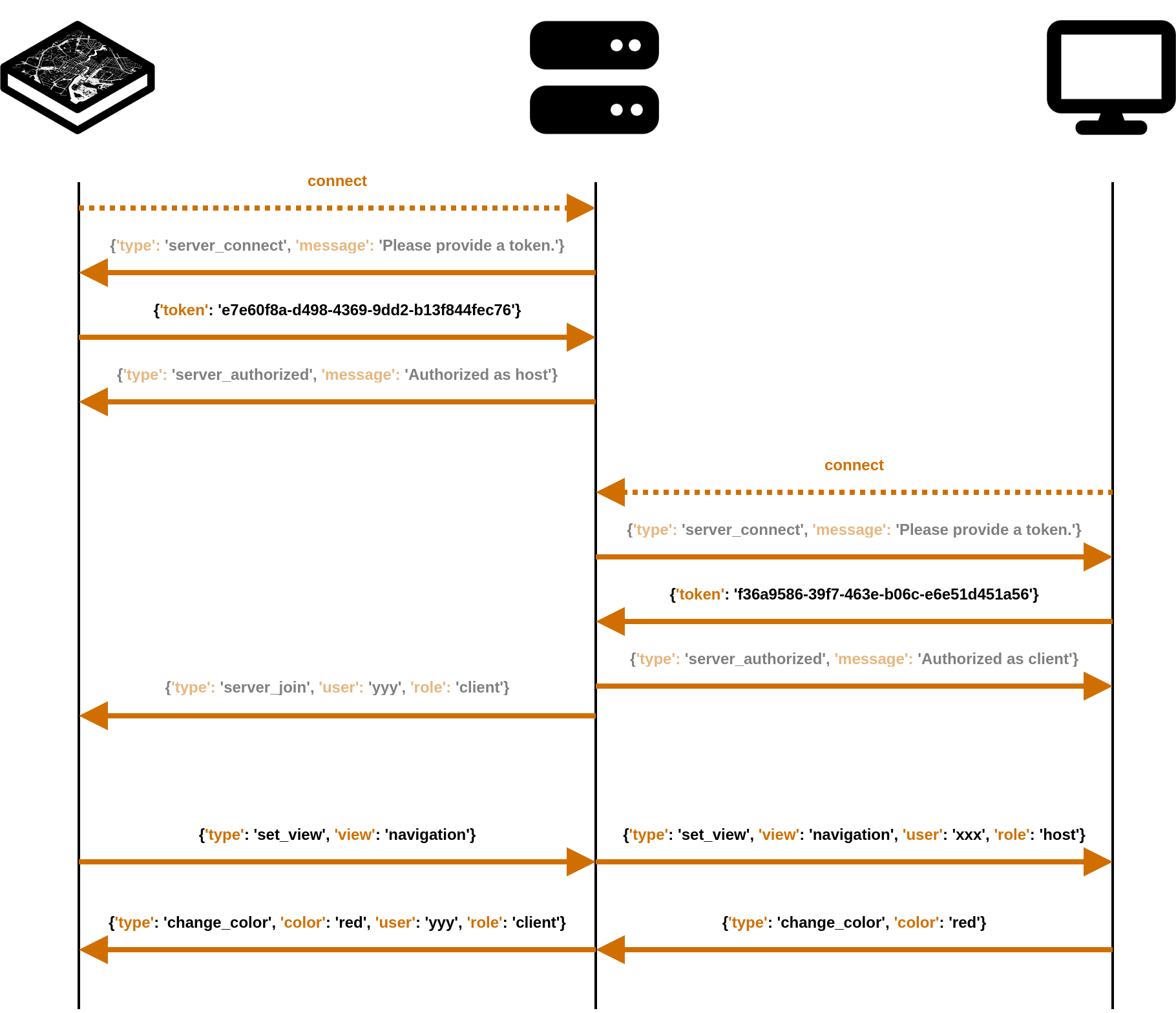
This architecture allows for loose coupling between the interface and the platform, while still ensuring structured, predictable communication. The Omni layer takes care of connectivity and routing, while the DigitalTwin layer focuses on meaning and intent.
Communication Protocol: Custom Messages
This page documents the JSON protocol used for communication between the Phaser interface and the Unreal platform, routed through Omni. All messages are exchanged using WebSocket in JSON format. Each message consists of a type field indicating its purpose.
Methods
- Ping — Check connection status
- Reset — Clear data layers and restores Unreal
- Recache — Fetches data layers during runtime
- Status — Fetch information about cached images
- Layer — Handle map data layers: images, videos, live streams, etc.
- Light — Handle virtual sunlight for a given date and time of day
- Marker — Handle markers to highlight features
Omni WebSocket Communication
This page documents how the Unreal host application and the Phaser interface communicate through Omni — a WebSocket server for multi-role communication.

Overview
Omni connects applications using roles: host, client, and guest. Each role connects using a token or public code, and messages between roles are sent in JSON format.
Roles in This Project
- Host: The Unreal Engine application that displays and controls the city model.
- Client: The Phaser-based touch interface (e.g., on a touchscreen or tablet).
- Guest: Not used in this project.
WebSocket Connection Flow
Step 1: Connect WebSocket
All applications connect to:
wss://omni.itn.liu.se/ws/
On successful connection:
{
  "type": "server_connect",
  "message": "Welcome! Please provide a token."
}
Authentication
Host (Unreal)
Send:
{
  "token": "<HOST_TOKEN>"
}
Responses:
{
  "type": "server_authorized",
  "message": "Authorized as host"
}
{
"type": "server_code",
"code": "<PUBLIC_CODE>"
}This code is what guests (if used) would use to join, but it's not needed for this project.
Client (Phaser)
Send:
{
  "token": "<CLIENT_TOKEN>"
}
Response:
{
  "type": "server_authorized",
  "message": "Authorized as client"
}
Server Meta-Messages
Omni sends the following messages automatically as clients/hosts connect or disconnect:
New Connection
{
  "type": "server_join",
  "role": "host" | "client" | "guest",
  "user": "<USER_ID>"
}
Disconnection
{
  "type": "server_leave",
  "role": "host" | "client" | "guest",
  "user": "<USER_ID>"
}
Disconnect Notification
{
  "type": "server_disconnect",
  "message": "Disconnected by server"
}
Error Message
{
  "type": "server_error",
  "message": "Invalid token" // or other error reason
}
Notes
- All communication after authentication is custom and defined by your own protocol (see: Custom Messages Protocol).
- A
clientcan connect before thehost, and will receive any custom messages once the host is available. - A
hostconnecting will override any previous host session, and will kick any connected guests.
Admin Panel
To manage tokens or create a new service, visit:
🔗 https://omni.itn.liu.se/admin/